Antivirus software in 2026: what it really does, what it cannot do, and how to choose
How this page is paid for
This is an advertising-funded guide. The buttons on this page are partner links: if you follow one and subscribe, the advertiser pays AROWANIE INSPIRE s.r.o. a commission. Your price is unchanged. We are not paid to say anything in particular, we hold no product under test, and we publish no ratings or testimonials. The advertiser on this page is Surfshark. We have no other relationship with it. Read the editorial policy for what we will and will not do.
For a few years it was fashionable to say that antivirus software was finished. Operating systems grew their own defences, browsers got better at blocking bad pages, and the noisy virus outbreaks of the 2000s stopped making the news. The software did not become pointless, but the honest case for buying it is narrower and more specific than most advertising suggests — including the advertising that funds this page. This guide sets out that case, and the places where it does not hold.
The short version
- On an up-to-date Windows PC, the built-in Microsoft Defender is a real antivirus product with real-time and behavioural protection, and it scores well in independent testing. Paid software is an upgrade, not a rescue from nothing.
- The strongest arguments for paying are cross-platform coverage from one subscription, browser-independent web filtering, extra anti-ransomware features, and a support line.
- On iOS and iPadOS there is no true antivirus, because the platform does not permit one. Anything sold as antivirus there is web filtering, VPN or breach alerting.
- The most reliable protection against ransomware is not a scanner. It is an offline backup you have actually restored from once.
- Check the renewal price and the cancellation route before you pay. That is where most of the regret in this market comes from.
What changed, and what did not
Two things changed at once. Defences got better: Windows, macOS, Android and the major browsers all ship security features that simply did not exist when “get an antivirus” became standard advice. And attacks got quieter. There is much less money in destroying a stranger’s computer than in encrypting their files, stealing their session cookie, or quietly enrolling their machine in a botnet. Loud, obvious malware has largely been replaced by software that wants you not to notice it.
What did not change is the economics. Criminal tooling is sold as a service, campaigns are run at industrial scale, and ordinary households are worth attacking because there are so many of them. European agencies have described this shift repeatedly: the ENISA threat landscape work and Europol’s organised crime threat assessments both describe ransomware and social engineering as persistent, professionalised categories rather than passing waves.
So the question is no longer “do I need protection?” — you already have some. The useful question is what a paid product adds on top of it, and whether that addition is worth the price on the renewal invoice rather than the price on the landing page.
What your operating system already does
This is the part most advertising skips, so it is worth being precise. Since Windows 10, Microsoft Defender Antivirus has been a full-time, real-time engine enabled by default. It is not a stub. According to Microsoft’s own documentation, it includes real-time file and process scanning, behaviour monitoring, cloud-delivered protection that can block a file the first time it is seen anywhere, a two-way firewall, and Controlled Folder Access — a feature designed specifically to stop unknown programs rewriting your documents. Microsoft Defender SmartScreen adds reputation checks on downloads and websites at the operating-system level, not only in the browser.
In the public comparative tests run by AV-TEST and AV-Comparatives, Defender has for several years placed among the competent products rather than at the bottom. It does not always top the table, and it has historically had more to say about false positives and performance than about missed samples, but the old claim that Windows ships with nothing worth having is simply out of date. We correct it here because the earlier version of this page implied otherwise.
macOS is a different shape of the same story. Apple’s Platform Security guide describes Gatekeeper, mandatory notarisation of distributed software, the XProtect signature scanner, System Integrity Protection and FileVault encryption. Android has Google Play Protect scanning installed apps and a strict per-app sandbox. iOS and iPadOS go furthest of all, and in doing so make conventional antivirus impossible — see the platform section below.
Surfshark Antivirus — the advertiser on this page
If you have read the sections above and decided you want a paid product across several devices, this is the offer that funds this guide. Check the current specification, platform list and renewal price on Surfshark’s own page before subscribing.
- Marketed for real-time malware scanning on desktop and Android
- Sold by Surfshark as part of its wider security bundle — confirm the exact packaging on the vendor’s page
- No antivirus product, this one included, replaces backups and updates
Partner link. If you subscribe after following it, AROWANIE INSPIRE s.r.o. earns a commission from the advertiser. You pay the same price either way, and we receive nothing if you simply read the page.
How a scanning engine reaches a verdict
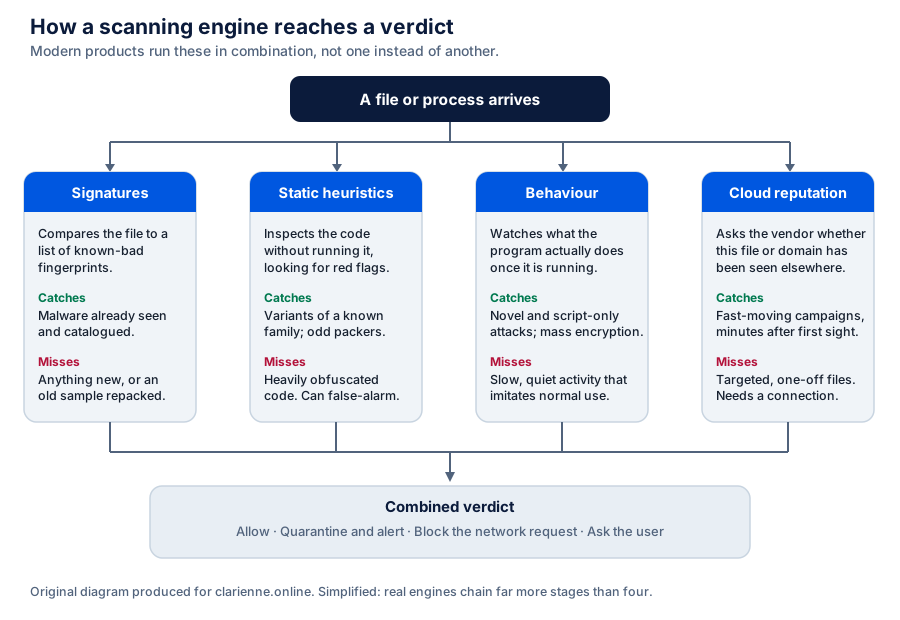
“Antivirus” is a single word for at least four different techniques running at once. Understanding which is which explains both why detection works and why it sometimes does not.
Signature matching
The oldest method: compare a file against a catalogue of fingerprints of known malware. It is fast, cheap and produces almost no false alarms. Its weakness is structural — it can only recognise what has already been catalogued, and attackers repack the same payload automatically to produce an endless supply of files that no catalogue has yet seen.
Static heuristics
Instead of matching the whole file, the engine inspects its structure without running it: unusual packing, suspicious API imports, code that looks generated to defeat analysis. This catches variants of known families. The cost is false positives — legitimate software, particularly small tools and installers from individual developers, frequently trips these rules.
Behavioural monitoring
The most important development of the last decade, and the main reason a scanner is still useful. Rather than judging the file, the engine watches what the running process does: does it inject into another process, disable recovery points, enumerate and rewrite thousands of documents in a few seconds, or reach out to a freshly registered domain? This is what catches malware that never writes itself to disk at all — the category often called fileless, where the malicious logic lives in a script or in memory inside a process the system already trusts.
Cloud reputation
The engine asks the vendor whether this exact file, certificate or domain has been seen across its user base. A file first observed eleven minutes ago on six machines worldwide is treated with more suspicion than one signed two years ago and present on millions. This is genuinely effective against fast campaigns, and it is also the feature with the clearest privacy cost: it means telling the vendor what you are running. Which is a reason to read the vendor’s privacy policy, not only yours.
Why layers, not one product
No single control is expected to stop everything, and any vendor claiming otherwise is selling rather than explaining. The realistic model is a set of rings, each catching some of what the ring outside it lets through.
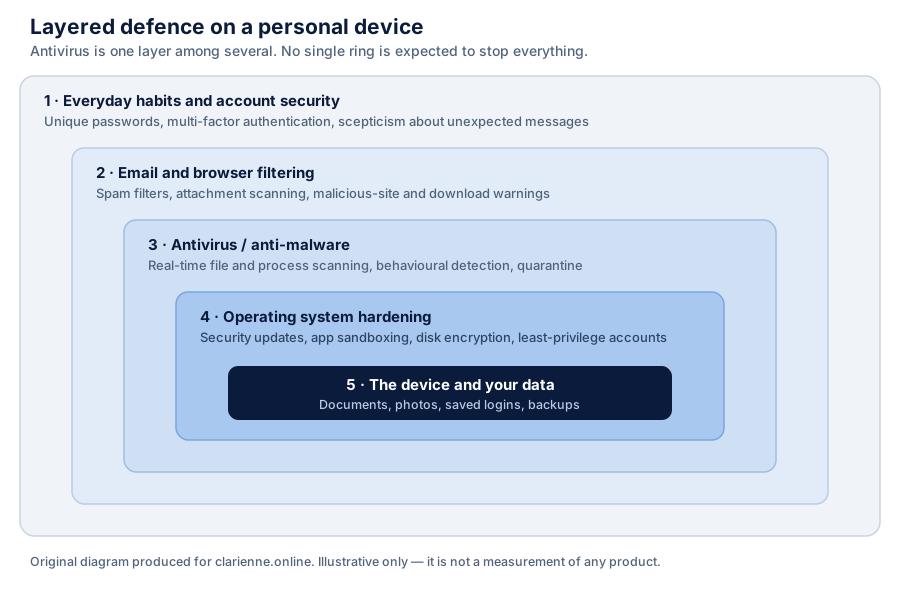
Read in that order, the priority list for most households is uncomfortable for the antivirus industry: install updates promptly, use a password manager with unique passwords, switch on multi-factor authentication on email and banking, keep a backup, and only then consider paying for a scanner. All but the last are free.
Ransomware, and where it can be stopped
Ransomware is the threat that defines the current consumer security market, partly because it is the one where the damage is instant and visible. It is also the clearest illustration of why timing matters more than any single product.
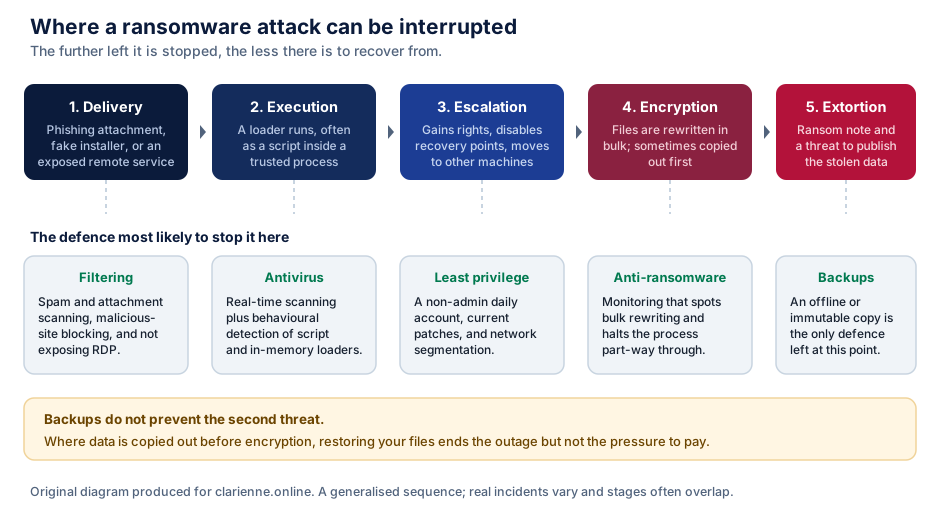
Two consequences follow. First, the widely repeated advice from agencies such as CISA and the UK NCSC puts backups, patching and access control ahead of detection. Second, the double-extortion pattern — steal first, then encrypt — means a restore is no longer a complete answer. That is a genuine limit of the whole product category, and it is worth knowing before you buy something advertised as ransomware protection.
Considering a paid layer?
If cross-platform coverage and behavioural anti-ransomware are what you are after, this is the advertiser that funds this page. Read the section on what it does and does not cover first, then check Surfshark’s own current terms.
View the offer on SurfsharkPartner linkPartner link. If you subscribe after following it, AROWANIE INSPIRE s.r.o. earns a commission from the advertiser. You pay the same price either way, and we receive nothing if you simply read the page.
Phishing and credential theft
For most people, the likeliest way to lose money or an account is not malware at all. It is handing over a password, or a one-time code, to a convincing page. No scanner can undo that; web filtering can sometimes intercept it, and a password manager that refuses to autofill on the wrong domain is arguably the single most effective anti-phishing control a household can deploy.
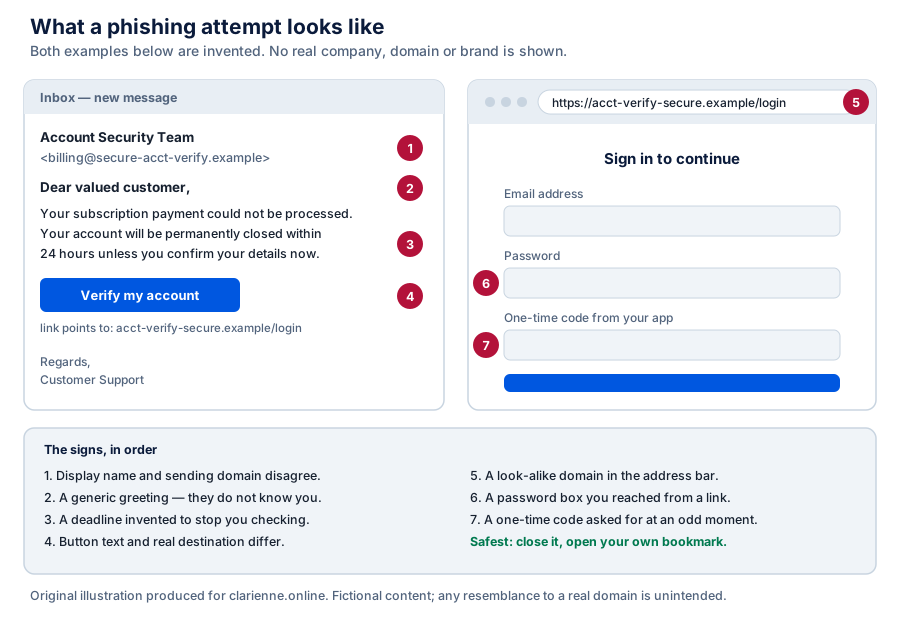
Two details are worth stressing because they are so often misunderstood. The padlock in the address bar means the connection is encrypted; it says nothing about who is at the other end, and criminals obtain certificates as easily as anyone else. And a request for a one-time code at an unusual moment is a strong signal, because the attacker typically needs it in real time to complete a login they have already started with your stolen password.
Backups: the part nobody sells you
Backups are unglamorous, rarely advertised and more valuable than everything above combined. The conventional rule of thumb is still the best starting point.
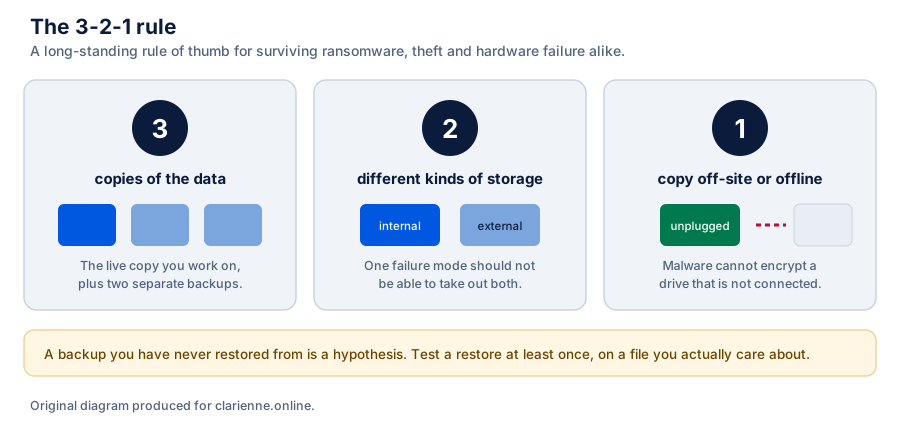
A disconnected drive cannot be encrypted by software running on your computer. Cloud sync is useful but is not by itself a backup, because a file that is corrupted or encrypted locally syncs in that state; what makes a cloud service a backup is versioning that lets you roll a file back to a point before the damage, and a retention window long enough to notice.
Platform by platform
A security subscription advertised as covering “all your devices” does very different things on each of them, and the differences are set by the platform vendors rather than by the security company.
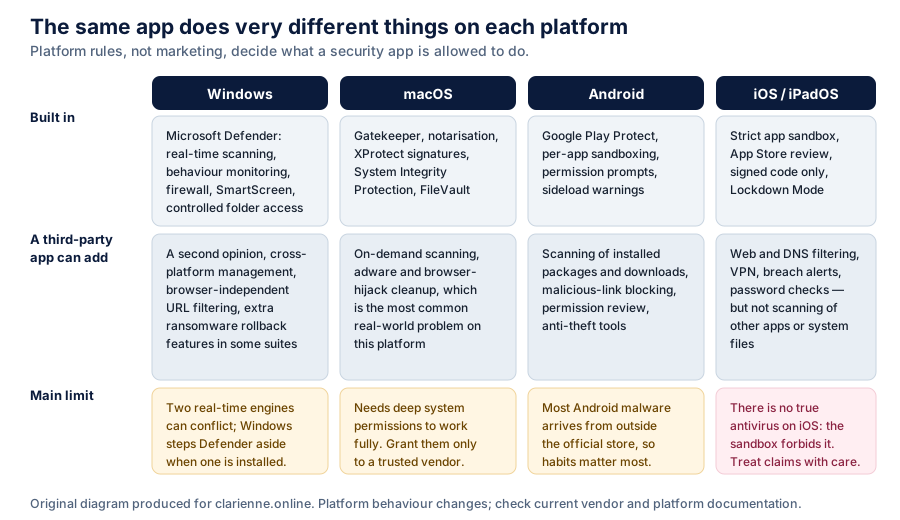
| Platform | Realistic benefit of a paid app | Main caveat |
|---|---|---|
| Windows | A second opinion, browser-independent URL filtering, extra ransomware features, one console across the household. | Defender is already capable. Running two real-time engines is not additive; Windows steps Defender aside when another registers itself. |
| macOS | Adware and browser-hijack cleanup, which is the most common real problem on the platform, plus on-demand scanning. | Requires deep system permissions to work fully. Grant them only to a vendor you have reason to trust. |
| Android | Scanning of sideloaded packages, malicious-link blocking, permission review, anti-theft. | Most Android malware arrives from outside the official store, so installation habits matter more than the scanner. |
| iOS / iPadOS | Web and DNS filtering, VPN, data-breach alerts, password checks. | Not antivirus. The sandbox does not let an app inspect other apps or system files. Any product claiming to scan an iPhone for viruses is describing something else. |
Performance: where the cost really is
An earlier version of this page claimed “zero performance impact”. That is not a claim anyone can honestly make, and we have removed it. Real-time scanning inspects files as they are opened, written and executed; that work is not free. What is true is that the cost is unevenly distributed, and knowing where it falls is more useful than a slogan.
- Idle and light use. On current hardware with an SSD, the overhead is usually not perceptible. This is where the marketing claim comes from, and in this narrow case it is roughly fair.
- Full disk scans. Genuinely heavy, by design. Schedule them, and expect fans and battery drain while they run.
- Bulk file operations. Compiling code, extracting a large archive, copying tens of thousands of small files, working with a large VM image — this is where real-time scanning is most visible, because every file passes the engine. Folder exclusions exist for exactly this, and should be used narrowly and deliberately.
- Startup. Suites that load several background services, browser extensions and an updater add measurable boot time. This is a suite problem more than a scanner problem.
If you want numbers rather than adjectives, the performance categories published by AV-Comparatives and AV-TEST measure exactly this on standardised hardware. We do not run our own benchmarks and we do not reprint theirs as if they were ours — read them at the source, and check the date, because results move between releases.
What antivirus cannot do
A short list, because it rarely appears in product copy:
- It cannot stop you typing your password into a convincing fake page, though web filtering may block the page itself.
- It cannot protect data that has already left your machine, or that leaks from a company you gave it to.
- It cannot fix an unpatched operating system or router.
- It cannot undo a scam payment you authorised yourself — by volume, one of the largest categories of consumer loss.
- It cannot reliably detect malware that arrives signed and bundled inside software you chose to install and approved.
- It cannot substitute for a backup, and it is not designed to.
A note on scare tactics. If a website, pop-up or phone call tells you that your device is already infected and you must act within minutes, that is itself the attack. No legitimate security company works that way, and neither do we — see the editorial policy on artificial urgency.
How to choose
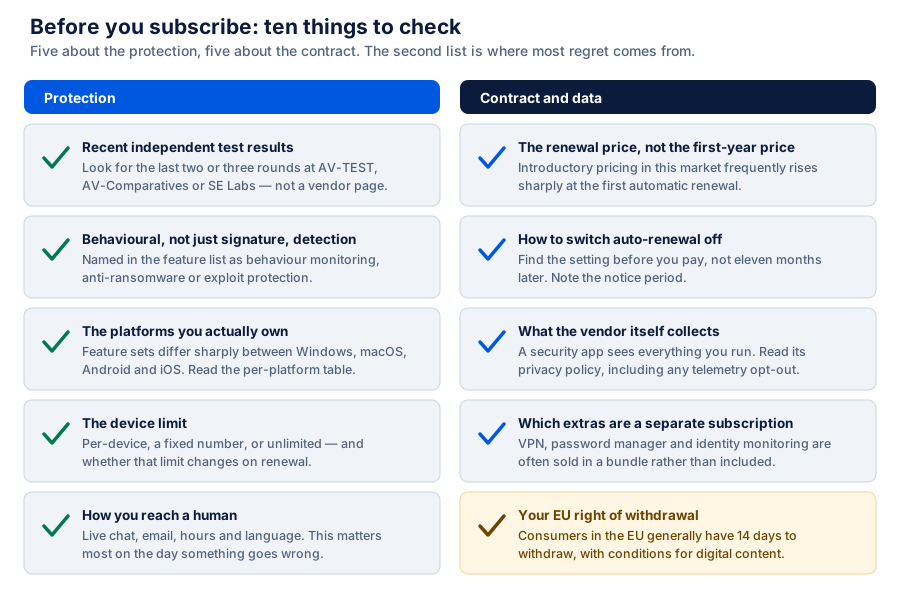
If you have decided a paid product is worth it, these are the ten things worth checking. Half of them are not about protection at all.
Renewals, bundles and your EU rights
Consumer security is sold on deep first-term discounts. The advertised monthly figure is usually the first year of a multi-year prepayment, and the automatic renewal is commonly at a materially higher rate. This is legal and disclosed, but it is disclosed in the terms rather than on the button, so it is worth finding before you pay rather than eleven months after.
Two rights are worth knowing if you are buying as a consumer in the EU or EEA. Under the Consumer Rights Directive (Directive 2011/83/EU) you generally have 14 days to withdraw from a distance contract, although for digital content and services there are specific conditions — notably that the right can be lost once supply has begun with your express prior consent and acknowledgement. Separately, the trader must give you clear pre-contractual information about the total price, the duration and the conditions for terminating the contract. If a checkout does not make the renewal terms clear, that is a reason to pause.
We are an affiliate, not a party to your contract. Any purchase you make is between you and the advertiser, and their terms, prices and refund policy govern it.
About the advertised product
The advertiser funding this page is Surfshark, and the product advertised is its antivirus offering. We want to be exact about the limits of what we can tell you.
We have not tested this product. We do not hold a licence for it, we run no laboratory, and we publish no score for it. What we can say is what is publicly documented at the time of writing: Surfshark markets an antivirus component for desktop and Android, with real-time scanning and scheduled scans, and it is generally sold as part of a wider security bundle alongside its VPN and breach-alert services rather than as a standalone item. On iOS the restriction described in the platform section applies to Surfshark exactly as it applies to everyone else.
Please check the vendor, not us, for the specification. Packaging, platform support, device limits and pricing in this market change often. Where anything on this page differs from Surfshark’s own current product pages, documentation, pricing or terms of service, the vendor’s own information prevails. Read it before you subscribe.
We have also removed several claims that appeared in the earlier version of this page and that we could not stand behind: that the product has “millions” of users, that it is “one of the best in its class”, that it has “zero performance impact”, and specific assertions about its interface and resource use relative to competitors. None of those were things we had measured. They are listed in the corrections note below.
Surfshark Antivirus
Our commercial relationship with Surfshark is an affiliate one and nothing more. Follow the link for the vendor’s own current description, platform list, device limit and price — including the renewal price.
Go to Surfshark’s sitePartner linkPartner link. If you subscribe after following it, AROWANIE INSPIRE s.r.o. earns a commission from the advertiser. You pay the same price either way, and we receive nothing if you simply read the page.
Frequently asked questions
Is Microsoft Defender enough on its own?
For a cautious user on an updated Windows machine who keeps backups and uses unique passwords with multi-factor authentication, it is a reasonable baseline and it performs respectably in independent tests. The arguments for adding a paid product are mostly about coverage of other platforms from one subscription, browser-independent filtering, additional ransomware features and access to support. If a household includes people who install a lot of software from unfamiliar places, the extra layer is easier to justify.
Should I run two antivirus products at once?
Not two real-time engines. They inspect the same files at the same moment and can flag each other, which causes instability and slowdowns. On Windows this is handled for you: when a third-party product registers with the Security Center, Defender steps back to periodic scanning. An occasional second-opinion on-demand scanner is a different thing and is fine.
Do I need antivirus on my iPhone?
You cannot have it, in the conventional sense. Apple’s sandbox prevents an app from inspecting other apps or system files, so no App Store product scans your iPhone for viruses. Security apps on iOS provide web and DNS filtering, a VPN, breach alerts and password hygiene checks. Those can be worth having; they are just not antivirus.
Do free antivirus products work?
Several free products use the same detection engine as their paid counterparts and perform comparably in detection tests. The differences are usually features, support and advertising inside the app. The thing to check is the business model: if a free security product is funded by data, the privacy cost is real, because a security product sees everything you run.
Is a VPN part of antivirus?
No, and the bundling of the two causes a lot of confusion. A VPN encrypts and reroutes your network traffic. It does not inspect files, does not stop malware you download, and does not make you anonymous. It is useful on untrusted networks and for hiding traffic from your network operator. It is a different tool with a different job.
My screen says I have 3 viruses and must call a number. What now?
It is a scam, without exception. Real security software does not display a telephone number and does not ask for remote access. Close the tab; if it will not close, quit the browser entirely. Never call the number, never install what they ask you to install. Then run a scan with the product you already have.
Sources and method
This guide is written from public primary documentation and from the published results of independent testing laboratories. We do not run our own tests, we do not accept products for review, and no figure on this page is our own measurement. Where we could not verify a claim, we have either hedged it or left it out. The sources below were used in writing it:
- AV-TEST Institute — comparative protection, performance and usability testing.
- AV-Comparatives — real-world protection and performance test series.
- SE Labs — full-attack-chain testing reports.
- Microsoft Learn — Microsoft Defender Antivirus features and behaviour.
- Apple Platform Security guide — Gatekeeper, XProtect, notarisation, sandboxing.
- Google Play Protect — Android application scanning.
- ENISA — European Union Agency for Cybersecurity, threat landscape work.
- Europol — Internet Organised Crime Threat Assessment series.
- CISA #StopRansomware — ransomware prevention and response guidance.
- UK NCSC — device security guidance.
- Directive 2011/83/EU — consumer rights, including the right of withdrawal.
- Surfshark — the advertiser’s own product documentation. Partner link — commercial; see the disclosure at the top of this page.
Independent testing laboratories publish results on a rolling basis and rankings change between rounds. Always check the date of the report you are reading. Nothing on this page is a paid placement in a ranking, because this page publishes no ranking.
Corrections and trademarks
Corrections made on 18 September 2026
This page was substantially rewritten. The following statements were present in the previous version and were removed or replaced because they were unsupported, misleading, or framed as something they were not:
- “Join millions of users who trust Surfshark Antivirus” — removed. We have no verified user figure.
- “Zero performance impact” and “zero performance drag” — replaced with an explanation of where the real overhead falls.
- “It is one of the best in its class” — removed. We publish no ranking and have run no test.
- Claims that the product’s engine “uses a fraction of the resources that legacy antivirus products consume” and that its interface is “a single, clean screen” — removed as unverified product specifications.
- The assertion that built-in operating system tools “lack real-time behavioural analysis” and “advanced phishing protection” — corrected. Microsoft Defender provides both.
- A statement about which components the product does and does not include — replaced with a pointer to the vendor’s own current documentation.
- The site-wide framing as “Reader Stories” and the footer line describing the article as “a reader-submitted story” — removed. No part of this page was submitted by a reader, and presenting it that way was misleading.
If you believe something here is still wrong, please write to info@clarienne.online. Our corrections procedure explains what happens next.
Trademarks and independence. Surfshark is a trademark of its owner. All other product, company and service names mentioned on this page are the property of their respective owners and are used here purely to identify the products discussed. clarienne.online is published by AROWANIE INSPIRE s.r.o. and is not affiliated with, endorsed by, sponsored by, authorised by or otherwise connected to Surfshark, Microsoft, Apple, Google or any other brand named here, beyond the ordinary affiliate relationship disclosed at the top of this page. All visuals on this page are original diagrams created by us; no product screenshots, vendor artwork or stock photography are used.